CASE STUDY
WechatArticle:两次内容生产与跨平台发布的复盘
我在公众号、小红书和即刻记录自己用 AI 工具做项目的经历,写给同样对 AI 感兴趣的人。写一篇内容,要准备选题、大纲、正文和配图,发到不同平台还要再改一遍。WechatArticle 就是我用来整理这些步骤和材料的小工具。
| 项目速览 | 内容 |
|---|---|
| 使用场景 | 我自己的内容生产与跨平台发布 |
| 我的职责 | 设计工作流,决定选题、编辑方案、排版与最终发布 |
| AI 协作 | 全部代码由 AI 编程工具完成;外部 AI 辅助文案和配图,我负责选择与复核 |
| 可核对成果 | 两个选题的内容包、平台适配稿,以及本人保存的发布与数据截图 |
| 当前阶段 | 已完成首轮实践,尚无稳定增长或节省工时的证据 |
每一步的稿子都留下来
我把大纲、正文、修改和配图分开处理。工具按文章目录保存提示词(Prompt)、文稿和当前进度。我把提示词交给外部 AI,拿到结果后再存回来。
这样做仍然要来回切换工具。好处是,大纲不合适就先改大纲,正文里有疑问就停下来核对,改过的版本也能留下来。WechatArticle 主要负责把材料和步骤组织好;写作、生图靠外部工具,公众号草稿准备复用了 baoyu 发布技能。写作与目录管理实现、CLI 与技能调用
这两次制作都是我定选题,让 AI 生成标题、文案和配图提示词,再把提示词交给生图平台。最后检查排版、点下发布,还是由我来做。这部分过程依据我的回忆,当时没有留下逐步运行日志,也没有记录每一步花了多久。
点了“完成”,即刻稿还没有准备好
查看早期实现,文章完成后的操作主要是生成发布指南。长文有了,发到即刻需要的短稿却还得另外准备。对于我想走的跨平台流程,长文完成只走到了一半。
4 月 21 日的一次修改补上了这段交接:完成文章时,工具把全文放进即刻改写提示词,保存为 jike_prompt.txt,并把即刻状态记为 prompt_ready。随后可以用 wechat jike 查看或复制相关内容。没有短稿时,工具会提醒把提示词交给 AI,再把结果保存回来。
这里的“准备好”有一个很窄的含义:准备好了下一步要用的提示词。它并不代表短稿已经生成,更不代表文章已经发布。我的工作仍然包括把结果拿回来、改稿,以及最后点击发布。保留这个区分,回看进度时才知道究竟停在哪一步。
这些实现细节来自固定版本和提交记录,代码由 AI 编程工具完成。当时没有留下足够的逐步对话,我能说明版本怎样变化,不能把每次技术定位都写成自己亲手解决的经历。
小红书配图提示词改一处,还要找另一处
小红书适配又多了一层:长文要拆成卡片,每张卡片需要配图提示词。早期代码里,相近的视觉提示词在不同生成位置重复保存。以后调整画面要求,就需要同步修改,漏掉一处便可能产生不同版本。
4 月 28 日的修改把这组内容提取到同一份 _VISUAL_PROMPTS 配置,保存中英文提示词,供不同输出路径使用。这个改动没有让卡片更懂读者,但减少了维护同一套配图要求时要找的位置。
这次还加入了输出和小红书生成测试。检查的内容很具体:是否生成预期文件,五张卡片的首张是否为封面、末张是否为结尾,是否包含中英文提示词,以及独立提示词目录里是否有五份文件。它们能帮忙发现文件漏生成或格式变动,文章好不好看仍然需要我读。本次整理只检查了测试代码,没有重跑这些测试。
我选了两段经历来写:“同一个项目做了两遍”和“第一个 AI 编程项目重新启动”。公众号用长文讲清来龙去脉,小红书整理成卡片,即刻挑出一段经历和想讨论的问题。三个平台分别发布,日期并不相同。
小红书适配器按规则和模板提取内容,附上配图提示词与发布指南。我拿到卡片稿后,还得看一遍:前提有没有删掉,标题有没有说过头,单看一张卡片能不能读懂。目前没有做过 A/B 实验,还不知道这种改法是否比直接缩短长文更有效。小红书适配实现
稿件、测试文章和生成文件开始混在一起
内容制作会留下很多文件:正文、卡片稿、图片、HTML,还有为某次处理写的小脚本。版本记录里也能看到旧选题目录、测试文章和旧索引。这些东西都放在一起,复盘时就要先分清哪些是保留的内容,哪些只是中间产物。
后续清理分了几次做:生成图片加入忽略规则;过时的第一版文章目录、测试选题和旧索引被移除;到 5 月 5 日,又把内容目录下的生成 HTML 和一次性图片嵌入脚本排除出版本跟踪。仓库留下主要内容包,生成物按需要在本地产生。
这只能解决文件整理的一部分。回头核对发布截图时,我仍然发现本地状态和日期没有完整更新。比如第二个选题的元数据把公众号和即刻都记为 4 月 18 日,截图显示的却分别是 4 月 30 日和 4 月 21 日。三个平台本来就可以分开发布;需要修正的是各平台自己的记录,不能拿目录日期代替它们的发布时间。截图没有显示的年份也不能自行补上。
下一轮我需要单独留下发布账本:哪个平台、哪一版稿子、实际发布时间、文章链接。光有一个“已完成”的状态,回答不了这些问题。
发布之后,还缺什么记录
下面是我保存的截图里的数据。截图是哪天截的,现在没有记录,也没有统一到发布后的同一天统计。“阅读”和“观看”沿用各平台的叫法,不能拿来直接比较。
| 选题 | 公众号 | 小红书 | 即刻 |
|---|---|---|---|
| 同一个项目,我做了两遍 | 12 阅读、1 赞、1 转发 | 162 观看、9 赞、6 收藏、0 评论、0 分享、涨粉 2 | 0 赞、0 评论、1 分享 |
| 第一个 AI 写代码的项目,睡了八个月才醒来 | 3 阅读、1 赞、0 转发 | 51 观看、5 赞、5 收藏、0 评论、0 分享 | 0 赞、2 评论、0 分享 |
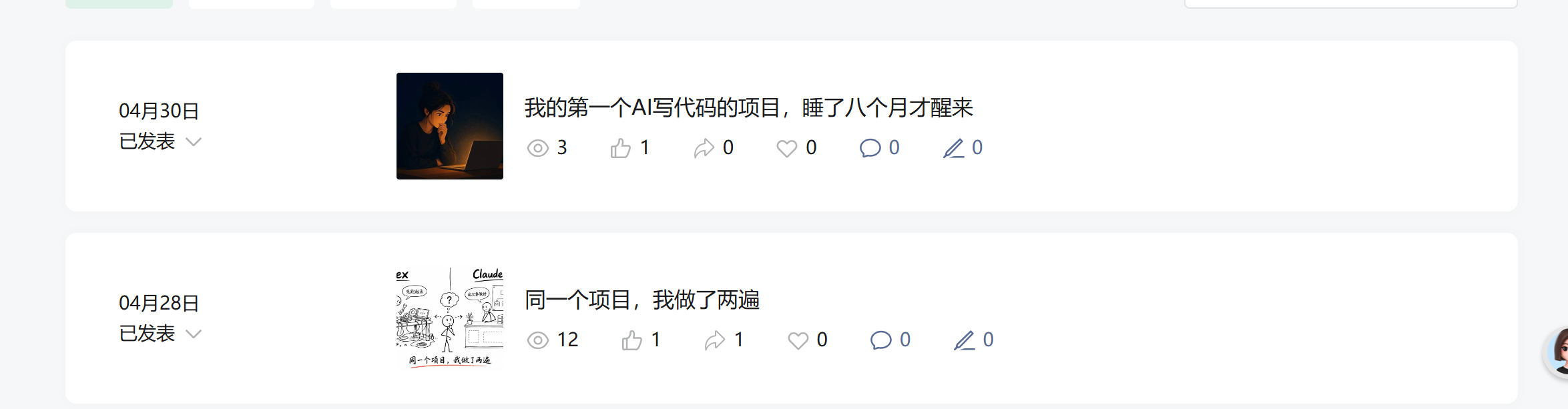
截图显示两篇文章已发表,分别为 12 和 3 次阅读。页面只显示发布月日,没有年份;这些数值不是发布后固定天数的统一统计。
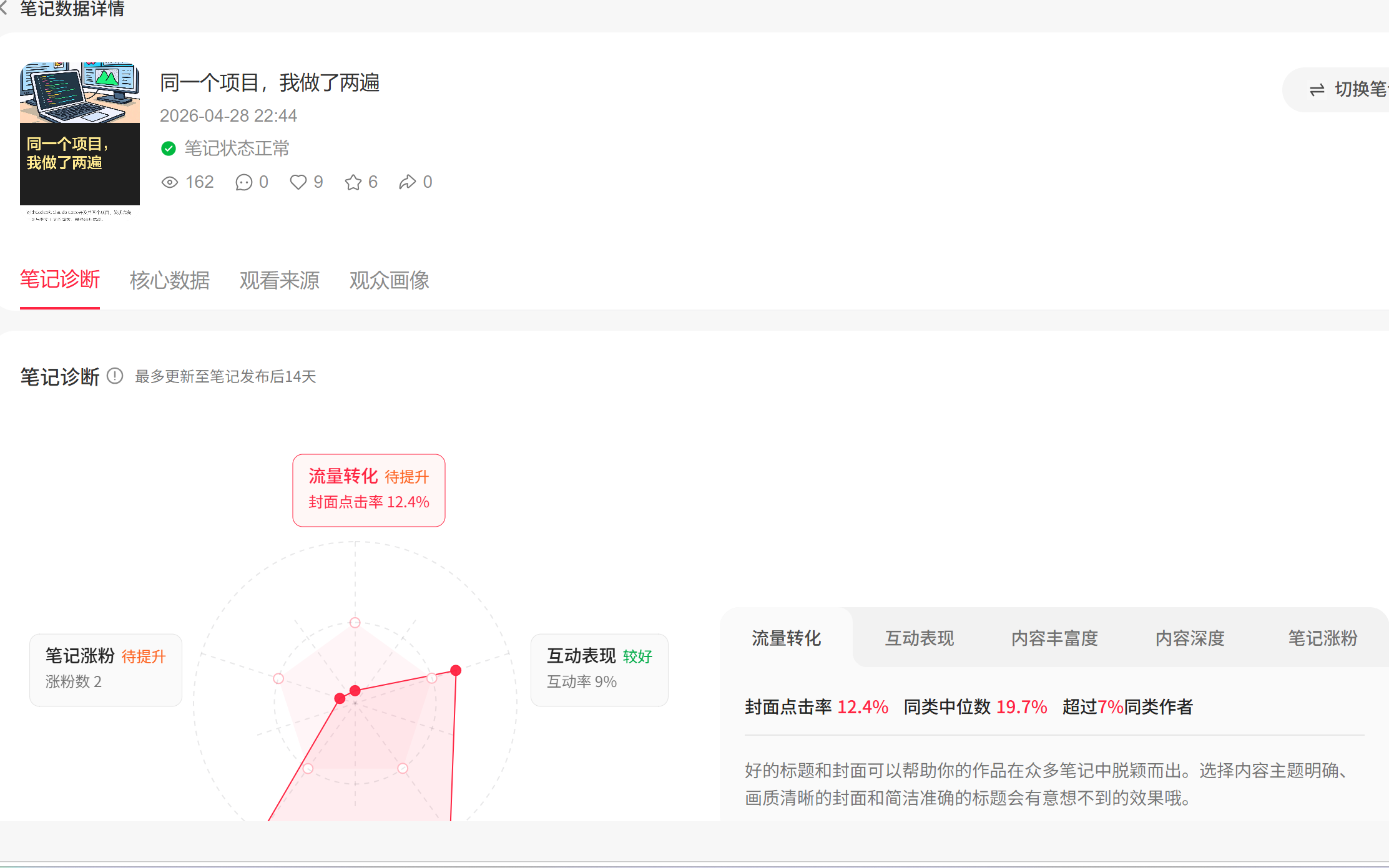
《同一个项目,我做了两遍》的页面显示发布时间为 2026-04-28 22:44,观看 162 次、点赞 9 次、收藏 6 次、涨粉 2。诊断区显示封面点击率 12.4%、同类中位数 19.7%;页面提示诊断最多更新至发布后 14 天,截图采集日未知。
发布时,几个账号的粉丝或订阅数都在个位数,具体多少没有记下来。这点数据还分不清:是账号基础太小,还是选题、标题或发布时间的影响。有人收藏、有人关注,值得继续观察,但还谈不上找到增长方法。
比继续加一个生成命令更需要补的,是制作记录。下一次从选题开始,记下每一步用了多久、AI 的稿子改了什么、在哪个交接处停了下来,再约定发布后哪天记录数据。现在只能确认两组选题走到了发布,还不知道工具究竟省了多少事。
材料与版本
文中实现对应仓库版本 41740df1373f23e66aeabc3d9405f5c0a003b8e2,也可以查看当时的项目复盘与账号定位原文。我在 2026-09-08 确认过,两个选题都已发到三个平台。本次整理核对了保存的五张截图,没有登录后台、重跑发布流程或重新测量数据。
WechatArticle: Two content runs and a cross-platform publishing workflow
I write about using AI tools to make projects on WeChat Official Accounts, Xiaohongshu, and Jike, for people who are also interested in AI. Each piece needs a topic, outline, body, and visuals; each platform then needs another adaptation. WechatArticle is a small tool I use to organize those steps and materials.
| Snapshot | Details |
|---|---|
| Use case | My own content production and cross-platform publishing |
| My role | Workflow design, topic choice, editing, layout, and final publishing |
| AI collaboration | All code was produced with AI coding tools; external AI helped with copy and image prompts, while I selected and reviewed the results |
| Checkable output | Content packages for two topics, platform adaptations, and screenshots of publishing and metrics that I kept |
| Current stage | A first practice round is complete; there is no evidence of stable growth or time saved |
Keep the draft from every step
I separate the outline, body, edits, and visual work. The tool stores prompts, manuscripts, and current progress in an article directory. I pass prompts to an external AI tool, then save the result back.
This still means switching between tools. The benefit is that I can revise an outline before writing, stop to check a question in the body, and keep the changed versions. WechatArticle mainly organizes the materials and steps; writing and image generation use external tools, and the WeChat draft preparation reused the baoyu publishing skill. Writing and directory implementation, CLI and skill calls
For both pieces, I chose the topic, asked AI for titles, copy, and image prompts, passed those prompts to an image platform, checked the layout, and clicked publish myself. This process account comes from memory; I did not keep step-by-step run logs or record how long each step took.
Clicking “complete” did not prepare the Jike post
In the early implementation, completing an article mainly generated publishing guidance. The long article existed, but the short Jike version still had to be prepared separately. For the cross-platform flow I wanted, completing the long article was only halfway.
A change on April 21 added that handoff. When an article is completed, the tool puts the full text into a Jike rewriting prompt, saves it as jike_prompt.txt, and marks the Jike state as prompt_ready. wechat jike can then show or copy it. Without a short draft, the tool reminds me to give the prompt to AI and save the result back.
“Ready” has a narrow meaning here: the prompt for the next step is ready. It does not mean the short draft exists, much less that the article is published. I still need to bring the result back, edit it, and click publish. Keeping those states separate makes it possible to see where the work actually stopped.
These implementation details come from a fixed version and its commit history. AI coding tools produced the code. The original conversation was not preserved well enough for me to present each technical diagnosis as work I personally debugged.
Changing one Xiaohongshu prompt meant finding another copy
Xiaohongshu adds another layer: a long article becomes cards, and each card needs an image prompt. Early code stored similar visual prompts in multiple generation paths. A later visual change therefore required several edits, and missing one could create inconsistent versions.
A change on April 28 extracted the prompts into one _VISUAL_PROMPTS configuration containing Chinese and English versions, shared by the different output paths. It reduced the number of places to maintain; it did not prove that the cards became easier for readers to understand.
That change also added output and Xiaohongshu-generation tests. They check whether expected files exist, whether the first of five cards is a cover and the last is an ending, whether both Chinese and English prompts are present, and whether five files exist in the standalone prompt directory. These checks catch missing files and format drift; I still need to read the article to judge whether it works. This pass inspected the test code but did not rerun it.
I chose two experiences: “I built the same project twice” and “my first AI coding project woke up after eight months.” WeChat uses a long article for the full story, Xiaohongshu turns it into cards, and Jike selects an experience and a question to discuss. The three platforms were published on different dates.
The Xiaohongshu adapter extracts content by rule and template, adds image prompts and a publishing guide, and leaves me to review the cards: has the premise been cut, does the title overclaim, and can one card stand alone? There has been no A/B test, so I do not know whether this works better than simply shortening the long article. Xiaohongshu adaptation
Manuscripts, test articles, and generated files started to mix
Content production leaves many files: bodies, card drafts, images, HTML, and one-off scripts. Version history also contained old topic directories, test articles, and old indexes. They were all together, so a review first had to separate retained content from intermediate output.
Cleanup happened in several passes. Generated images were added to ignore rules; an outdated first article directory, test topics, and an old index were removed; on May 5, generated HTML and a one-time image-embedding script were excluded from version tracking. The repository keeps the main content packages, while generated files are produced locally when needed.
That only solves part of the record-keeping problem. When checking publishing screenshots, I still found local status and dates were incomplete. For example, metadata for the second topic recorded both WeChat and Jike as April 18, while the screenshots showed April 30 and April 21. Platforms can publish separately; each platform needs its own date rather than inheriting the directory date. A year missing from a screenshot cannot be filled in by assumption.
Next I need a publishing ledger with the platform, manuscript version, actual time, article link, and the metric window. A single “complete” state cannot answer those questions.
What is still missing after publishing
These are the numbers visible in the screenshots I kept. The capture dates are not recorded, and the metrics were not normalized to one post-publication day. “Reads” and “views” use each platform’s own labels and cannot be compared directly.
| Topic | WeChat Official Account | Xiaohongshu | Jike |
|---|---|---|---|
| I built the same project twice | 12 reads, 1 like, 1 share | 162 views, 9 likes, 6 saves, 0 comments, 0 shares, 2 new followers | 0 likes, 0 comments, 1 share |
| My first AI coding project woke up after eight months | 3 reads, 1 like, 0 shares | 51 views, 5 likes, 5 saves, 0 comments, 0 shares | 0 likes, 2 comments, 0 shares |
The screenshot shows that both articles were published, with 12 and 3 reads. The page shows month and day but not the year; these are not normalized post-publication measurements.
The “I built the same project twice” page shows a publication time of 2026-04-28 22:44, 162 views, 9 likes, 6 saves, and 2 new followers. The diagnostic panel shows a 12.4% cover click-through rate against a displayed peer median of 19.7%. The page says diagnostics update for up to 14 days after publishing; the screenshot capture date is unknown.
At publishing time, each account had single-digit followers or subscribers; I did not record the exact counts. This is not enough to separate account size from topic, title, or timing. Saves and follows are worth watching, but they do not establish a growth method.
The more useful next step is a production record, not another generation command. Starting with the topic, I need to record time spent, AI edits, and where each handoff stopped, then choose a post-publication date for metric capture. At present I can confirm that both topic packages reached publication; I do not know how much work the tool saved.
Materials and version
The implementation described here corresponds to repository version 41740df1373f23e66aeabc3d9405f5c0a003b8e2, including the original project review and account-positioning source. I confirmed on September 8, 2026 that both topics had been published on all three platforms. This edit checked the five saved screenshots; it did not log into a dashboard, rerun publishing, or remeasure the data.